Backup and Restore Different Browser Settings Easily with FavBackup

FavBackup is a freeware portable software for Windows users that lets you save and migrate almost any major web browser settings. It archives all your personal settings and data such as bookmarks, history, cookies, and saved passwords from all major web browsers: Google Chrome, Firefox, Opera, Internet Explorer, Safari and Flock.

In this digital age, one just can’t afford to lose their personal settings and data. As the number of web browser choices have increased, most of us like to use multiple web browsers for surfing the Internet. Keeping a backup of all the data, spread over all these different browsers is difficult, thanks to FavBackup it is less of a hassle now. FavBackup offers an easy and comprehensive way to back up all the data and even lets you migrate easily to a browser on a different computer.

FavBackup is completely portable application and requires no installation. The program has an intuitive Ribbon user interface, so getting started with it is easy and quick. After downloading the program, extract the FavBackup executable file in your choice of folder, run the executable. [Read more...]

TuneBite: Record your Favorite FIFA World Cup Football 2010 Videos

TuneBite is an easy to use application that allows users to easily remove DRM protection from music files, videos, and audio books. The added benefit of TuneBite is it’s ability to record videos off any video sites like YouTube, DailyMotion, MetaCafe, etc and convert it to a format the user likes. And this football season, TuneBite will really come handy for all the soccer fans out there who may want to record the matches, so that they can watch it later.

The Internet offers a lot of soccer videos at special soccer video sites. For instance you can visit any of the following and watch soccer videos. Most of these websites are also offering free World Cup Football South Africa 2010 videos. [Read more...]

How To Close Several Applications in One Step [Quick Tip, Windows]

When ever you work, you often open several applications. Now suppose, you have to go somewhere and you are in a hurry. To shutdown Windows, you have to first close each applications individually, which is very annoying at that moment of time. You want a simple way to close all the programs in just one step and want a simple solution to this problem. Well, Windows provides you with an in-built feature that addresses this problem.

To close several applications and open windows in just one step, keep pressed the [Ctrl] key when you select the buttons of the programs and windows in succession in the Taskbar. You will see that as you select the buttons, they seem pressed. After doing the selection, release the [Ctrl] key and right-click the last selected pushed-button. Select “Close group” from the context menu. Windows will now close all the selected applications and windows at once. [Read more...]

WinTinker Password Generator – Easily Generate Secure and Easy-to-Remember Passwords

WinTinker Password Generator is a light portable application with a download size of only 124 KBs, but don’t be fooled by its small size! Under the hood, it is a very powerful password generator. In the past, we have seen how accounts got hacked because of using simple dictionary words as passwords. It becomes extremely important to make sure that the passwords that you are using for WEB 2.0, be it, social networking sites, online banking accounts or anywhere online are very strong, secure and hard to break.

While searching online for password generators you will get tons of apps. But the only problem with them is that the passwords that they generate are filled with random alphabets, numbers and symbols which is very hard to remember. For this reason, you may note down the generated password which renders the process of having secure passwords. [Read more...]

Rizone Security Restore – Easily Restore your Computer to Default Security Settings

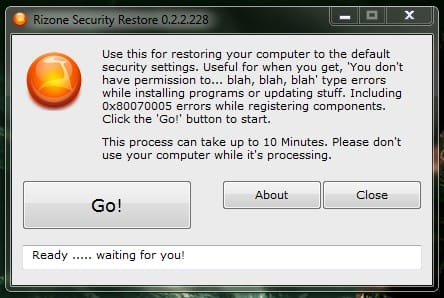
Most of the time, in the event of a virus attack, the virus changes computer security settings to hide itself and do harm. Even though, you may have cleaned the virus by using the various security tools, these changed security settings remains intact in the computer which further causes trouble. You may start getting various “You don’t have permission to…” errors, which is very frustrating. Previously, we have written about tools like Re-Enable, XP Quick Fix Plus and 7 Quick Fix which to some extends help restoring default settings in Windows. We found a new utility which is built specially to restore the default security settings of Windows. [Read more...]

7 Taskbar Tweaker – Best Utility to Control Windows 7′s Taskbar

Do you like the new Windows 7 Taskbar? Do you want to have more control over its functionality and fine tune the settings-like middle-click to close or focus a window and other behavior? Here’s a small portable utility, 7 Taskbar Tweaker, that does the job.

7 Taskbar Tweaker lets you toggle up to six different features:

  • Show standard window menu on right-click instead of jumplist
  • Close or focus a window on middle click instead of running a new instance
  • Disable grouping of windows by file path or application id
  • Cycle through windows of a grouped button on left click instead of showing a thumbnail preview
  • Open with while dropping a file on a taskbar button instead of pinning
  • Disable thumbnail previews

[Read more...]

How To Completely Remove Kaspersky Anti-Virus/Internet Security 2010

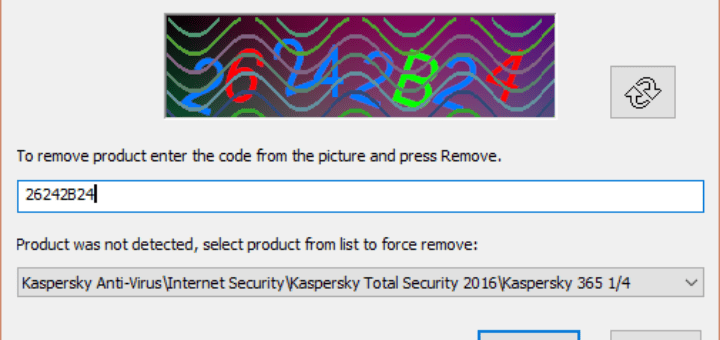
Kaspersky Antivirus 2010 and Kaspersky Internet Security 2010 are one of the best security suites available in the market. For some reason if you want to remove Kaspersky Antivirus or Internet Security 2010, then you can do so via Start > Control Panel > AddRemove Programs. But if you are facing some errors while uninstalling/deleting Kaspersky product from your machine, do not worry as Kaspersky provides a small application to completely remove Kaspersky Antivirus 2010 / Kaspersky Internet Security 2010 from your PC. This tool is very simple, small and portable. [Read more...]

Lunascape Web Browser – World’s First Triple Engine Hybrid Browser

lunascape-logoLunascape is a web browser with a kind of uniqueness that you cannot find in others. It is very unique in that it has three rendering engines: Gecko (used in Mozilla Firefox), Webkit (used in Apple Safari and Google Chrome), and Trident (used in Microsoft Internet Explorer). The user can switch between layout engines seamlessly and even without restarting the browser. This makes the browser all-in-one solution for perfect web experience.

The support for compatible add-ons makes it more unique. For instance, you can use all your favourite Firefox add-ons when you are using the Gecko engine. You will get the same experience that you get when you use your favourite browser. [Read more...]