Fix Protected Content Playback Errors on Windows 8 After You Install Cumulative Update (KB 2756872)

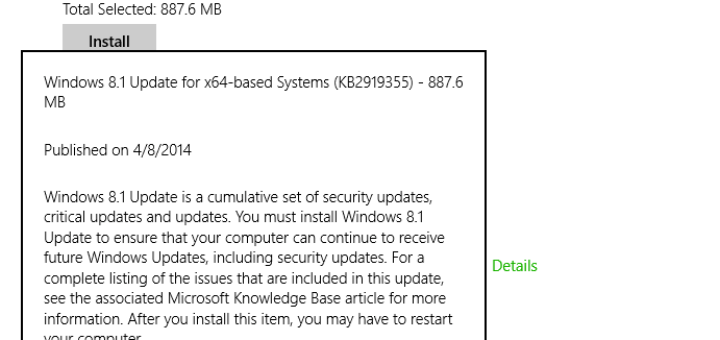
Microsoft has released a hotfix to fix protected content playback errors on Windows 8, after you have installed the General Availability Cumulative Update (KB 2756872), which was released few days back. The cumulative update was released ahead of Windows 8′s official release to the public. The fix was meant to bring performance, audio and video playback, application and driver compatibility, and battery improvements to the operating system.

Now, the Redmond software giant has found that if any user installs the cumulative update on their Windows 8 systems, they may face problem while playing protected videos in certain applications. The video will not play and you may receive error codes that varies depending upon the video player you used. To fix this issue, Microsoft has released a hotfix for computers running Windows 8. [Read more...]

Fix Black Screen With Blinking Cursor When Windows 8 Restarts After Shutdown or Hibernation

Windows 8 operating system upon force restart displays black screen with a blinking cursor. This issue occurs when restarting Windows 8 after it is shutdown or is in hibernation and you have set turn on fast startup power option. Most of the time, the cause of this kind of problem are due to bad drivers or other third-party programs, but not this time.

To fix this issue, Microsoft has released a hotfix (Fix413812). Announcing the hotfix (KB 2756559) for the problem, Microsoft support website has identified two scenarios which may cause the issue. Typically the issue has been found in Windows 8 installations that is Unified Extensible Firmware Interface (UEFI) compliant and that has a UEFI/GPT configuration.

Microsoft has asked only affected users to install the hotfix and asked its users to wait for the next P1 which will have this hotfix. Therefore, if you are running Windows 8 and haven’t faced the issue yet, do not install this hotfix. [Read more...]

Microsoft .NET Framework Repair Tool

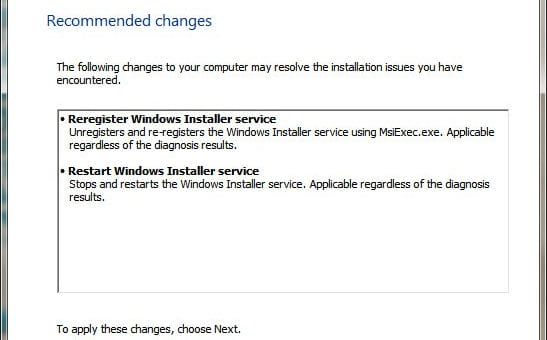
Microsoft .NET Framework is an important part of Windows operating systems. That is why, Microsoft preinstalls .NET Framework in every Windows operating systems. As with all other Microsoft software, the software giant releases updates for .NET Framework. Most of the time, .NET Framework updates complete without an issues. But sometime, those updates do not completes correctly. For addressing issues related to installing Microsoft .NET Framework updates, Microsoft has released the Microsoft .NET Framework repair tool. [Read more...]

How To Remove/Uninstall Hidden Devices (Ghosted Devices) From Windows?

Device Manager normally displays only non-Plug and Play devices, drivers, and printers when you click Show hidden devices on the View menu. It doesn’t display hidden devices that are installed but not connected anymore to the computer (also called “ghosted” devices). So, basically in Device Manager, there are two types of hidden devices in addition to the devices that are displayed; Typical, hidden devices like non-Plug and Play devices and Phantom (Ghosted) devices that are not connected to the computer.

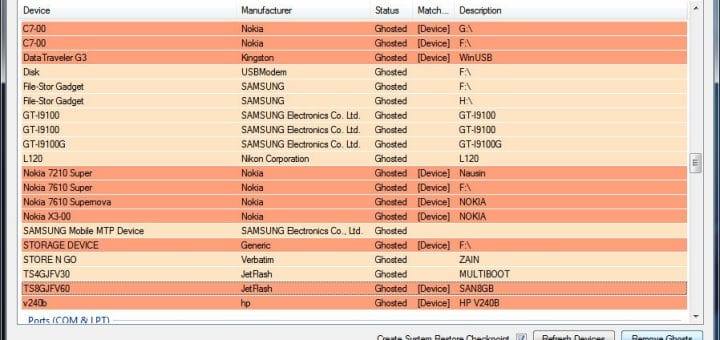
As you go on attaching and removing different devices to Windows, the number of ghosted or hidden devices increases. This causes different types of errors related to driver install. It also hampers system performance (though often negligible), since Windows tries to find all these devices at start-up. There is a simple workaround to display these ghosted devices in Device Manager. After displaying them, you can remove ghosted devices from your computer.

There is also a simple free application which helps you remove all hidden devices in one go. More on the app later in this article. First, lets see how we can make Device Manager display Hidden (ghosted) devices. From now on, I’ll interchange and refer to hidden devices as ghosted devices or vice versa. [Read more...]

Office 2010 Product Key Solution: Online Help For Microsoft Office Users

Microsoft is offering an online help utility to Office 2010 users having issues with the product key for their copy of the productivity suite to help them resolve their problems.

Earlier, we have posted many articles aiming to help out Microsoft Office users. Some articles related to Product Key problems. If you are having any issue with Office 2010 product key, you can refer to those articles. See this article to reset your Office Product Key using a small program. Or do you want to change Microsoft Office product key easily without the help of any other program? Wondering how to check the activation type and check the license status of Office? Want to use Office trial version for more than 30/60 days, up to 180 days? [Read more...]

DevManView: Windows Device Manager Free Alternative

DevManView is a very good free alternative to the standard Device Manager of Windows.

The standard Windows Device Manager is a simple and handy tool when troubleshooting Windows problems related to device drivers. It basically lets you browse through all the devices to check for device properties and driver conflicts or driver errors. But in terms of user experience, it doesn’t offer much of a good experience. Sometimes while using it, we here have also felt how cumbersome it is to use sometimes.

DevManView is a freeware program from the popular NirSoft developers. The program takes a different approach in displaying all devices and their properties. Instead of displaying the devices in a tree viewer like in the standard Windows Device Manager, it displays them in a flat table view. In addition to displaying the devices of your local computer, DevManView is an advanced device troubleshooting program that also allows you to view the devices list of another computer on your network, as long as you have administrator access rights to this computer. The program is also capable of loading the devices list from external instance of Windows and lets you disable unwanted devices. This feature is very useful if you have a Windows operating system which is not booting, and you want to disable the problematic device to boot into the operating system. [Read more...]

Complete Internet Repair: Say Goodbye to Network Problems [Windows]

Living in an Internet age has its own set of headaches. Problems related to the Internet not working properly, connection issues, high pings, slow connections, or complete drop in pings for no reason whatsoever. All these problems leaves the users confused and in trying to get them fixed asap, they spend a lot of time and money.

Here’s a freeware portable application for Windows, called “Complete Internet Repair,” which will save you from having to go through lengthy troubleshooting sessions. It will instead try to fix the Internet or networking issues in Windows with the click of a button. The best thing is that it will also repair Internet Explorer 9 along with others.

The free portable application will help you reset, restore, clear or repair a variety of Internet related settings on your Windows computer system. [Read more...]

How To Delete a Windows Service in Windows 7, Vista or XP [Tutorials]

Ever faced a situation where after uninstalling a software, you find that it has left behind its service or driver references in the registry, and when Windows tries to load them at every boot, it fails displaying an error? This mostly happens with the security programs (though other applications also causes trouble) that fails to remove its installed services or drivers. Even though we posted an ultimate list of antivirus removal tools, but it is not enough.

We need something which will solve the problem in general for almost every Windows applications that causes trouble. In this article, we will show “how to easily remove an orphaned or unwanted service or driver from your Windows system.”

Basically there are three methods to deal with the problem. You can either use Windows in-built sc.exe command, or use the Registry Editor, or using Microsoft Sysinternals Autoruns for Windows utility.

Warning: Use this tutorial with caution, once you delete a service from Windows system, it’s gone, and it will be very difficult to install it back. [Read more...]