AeroTweak: Tweak Windows By Changing 50 Different System Parameters

AeroTweak is freeware application for Windows 7 and Vista that allows you to easily change about 50 system settings and tweak Windows. The settings includes those that affects the user interface, system performance and system security. It is a standalone portable utility and does not need any installation as such.

AeroTweak also lets you recover your Windows 7 or Windows Vista product key. You can also view general system information. It lets you create System Restore point using only a click of a button before you make changes to your system, so that you can later revert back to old settings if you face a problem. [Read more...]

SMART Utility: Easily Tweak Windows 7, Vista, Windows XP Services

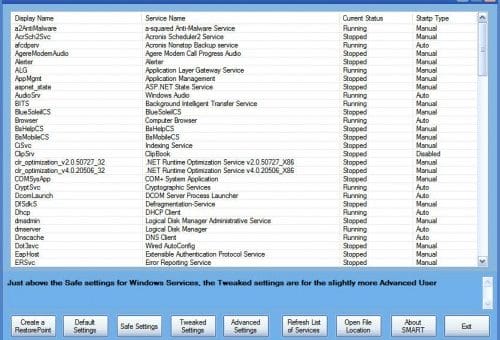
Windows service is a program or a process that runs in the background and provides support to other programs. Advanced users sometimes customize how the services run on their Windows and disables optional services or services which they don’t need to speed-up Windows. If you are novice user, and don’t want to mess around with Windows service settings, here is a smart tool to fine tune services in Windows 7, Vista and Windows XP.

SMART (Service Management and RealEasy Tweaking) is a small portable utility, developed by The Windows Club and is based on the suggested configurations of BlackVipers, to customize your Windows 7, Windows Vista and Windows XP service settings, according to your requirements. With SMART utility, you can Start, Stop or Disable services quickly. When you click on any service, SMART utility will show you detailed information about the service along with location of the service. [Read more...]

Get Free, Lifetime Valid, Genuine License of WinUtilities Pro worth $49.99 [Expired]

WinUtilities Pro is an award-winning collection of tools to optimize and speed-up your system performance. this suite has utilities to clean registry, temporary files on your disks, erase your application and internet browser history, cache and cookies. it also supports to defragment your disk drives and improve computer performance and stability. built-in StartUp Cleaner allows you to control startup programs that load automatically with windows, find duplicate files, fix broken shortcuts and uninstall unneeded software. other features include secure file deletion, recycle bin shredding, system maintenance tasks scheduling and undelete deleted files.

The developers of WinUtilities Pro, YL Computing, Inc, is running a giveaway exclusively for Softpedia readers. This means that you can get a free full version, genuine license code of WinUtilities Pro v 9.41, which is valid for lifetime and which normally retails at $49.99. [Read more...]

7 Taskbar Tweaker – Best Utility to Control Windows 7′s Taskbar

Do you like the new Windows 7 Taskbar? Do you want to have more control over its functionality and fine tune the settings-like middle-click to close or focus a window and other behavior? Here’s a small portable utility, 7 Taskbar Tweaker, that does the job.

7 Taskbar Tweaker lets you toggle up to six different features:

  • Show standard window menu on right-click instead of jumplist
  • Close or focus a window on middle click instead of running a new instance
  • Disable grouping of windows by file path or application id
  • Cycle through windows of a grouped button on left click instead of showing a thumbnail preview
  • Open with while dropping a file on a taskbar button instead of pinning
  • Disable thumbnail previews

[Read more...]

Windows In A Box – Access all the Features of Windows XP

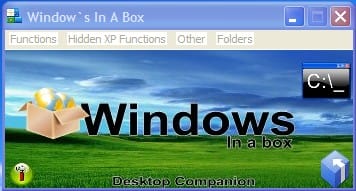
Do you ever get tired of searching for a particular setting inside the control panel or searching for that hidden application in Windows XP? Inside Windows XP there are hundreds of settings that require endless clicking through the Operating System that can get really frustrating. Windows in a box was designed to eliminate all that. It sits on your desktop, its easy to navigate, and it puts an end to all the frustration of endless searching for settings and hidden features or applications.

windows-in-a-box [Read more...]