Disable Java In Your Browser, On Windows, Mac OS X Platform [Complete Tutorial]

With more and more zero-day vulnerabilities are uncovered which is affecting Oracle’s Java plugin, users are now often asking how to disable Java or remove Java from their Windows computers or Mac platform.

First, let us clear the confusion which arises among most users about Java and JavaScript, keep in mind that both are different. Java is a programming language and computing platform that powers programs including utilities, games, and business applications, which was first released by Sun Microsystems in 1995, now developed and maintained by Oracle. While, JavaScript is an open source scripting language used to create dynamic websites and enhance user interfaces.

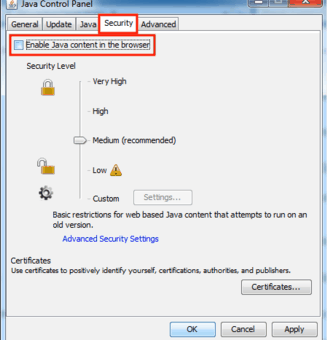
Looking at the increasing number of zero-day flaws that are getting uncovered, its advised that you do not to install Java at all, if you never felt the need of it. If you need Java for some important work, then you should only enable it when you need it. For the rest of the time you should keep Java plugin disabled in your browsers and you should also disable Java on Windows or OS X operating system. [Read more...]

Disable Chrome Metro, Always Open Google Chrome In Windows 8 Desktop

Windows 8 flaunts two different user interfaces, the new modern “Metro” interface and the classic desktop interface. Now, the problem with this is if your favorite web browser supports the new interface, you will actually end up using two versions of the same browser. The first version which is easily accessible through the new Windows 8 Start Page and the second through the classic desktop version. In this how to article, we will see how you can take control over this behavior of Google Chrome web browser. After completing the process, Google Chrome will be always forced to open in Windows 8 desktop regardless of where it was actually launched from. [Read more...]

Google Chrome Update: Google Chrome 22 Latest Version Download Links

The Stable channel has been updated to Google Chrome 22.0.1229.92 for Windows, Mac, and Linux. This update has a number of stability fixes, including an issue with multiple profiles on Mac OS X 10.8.2. It also fixes text display on the Mac, as well as several security updates as listed after the break. The latest update also has a new version of Flash with security and other fixes.

[Read more...]

Google Chrome for Android Finally Released, But Not Available To Everyone

Google Chrome has finally arrived for Android mobile devices.

On Tuesday, in an official Google Chrome blog post, the company announced the release of Chrome Web browser for Android app. While announcing, the company said that like the desktop version, Chrome for Android Beta is focused on speed and simplicity. The new browser features seamless sign-in and sync to make sure you get the same personalized web browsing experience wherever you go, across devices. [Read more...]

Uncircle+ Lets You Remove Inactive People From Your Google+ Account

Are you already touching the Google+ limit of 5000 people in your circles? Do you want to do some clean up and get rid of all the inactive people? Uncircle+ is a Google Chrome extension for you.

Uncircle+ lets you uncircle people (i.e. remove) inactive people from your Google+ circle with ease. So, if you want to add new people to your circles, you can add them without reaching the 5000 limit.

Do note that the “Inactive people” here referred by the author of the extension, are those people in your circles who have not shared any posts (original, reshare, private or public posts) with you. So, if that person is having at least one post, he is active. Thus, after doing the housekeeping with this extension, if you want to further cleanup “dormant” accounts, you have to do so manually. We are referring “dormant” here are those people who have not shared any post for a long time after they signed up. [Read more...]

Open ZIP and RAR With Google Docs Viewer [Google Chrome Extension]

Google Docs Viewer recently added support for viewing ZIP and RAR archive files online. With these two additions, Google Docs Viewer can now display 17 file formats in your browser. If you simply want to view the contents of ZIP or RAR archive files or just want to extract some files, you can now do so using the viewer.

Now, you might be wondering how to view the contents of the archive files using the viewer. If the archive was sent to you through email to your Gmail account, you can easily open it using Docs viewer. Now, lets you have just seen a very good freeware available in an archive file for download. You can always go ahead and click on the download button to download it. But why don’t take the advantage of Google Docs viewer and see beforehand whats inside that archive? It would have been time-consuming to do that manually, but thanks to the “Open ZIP and RAR With GDocsChrome extension, you can now easily view whats inside that ZIP or RAR archive file before downloading it. [Read more...]

How To Change Black Google Nav-bar Back To White Nav-bar [Quick Tip]

Google has launched a number of changes including a black nav-bar with gray font color, the navigation bar present at the top, which links to many Google services. But for many users this contrasting change is unacceptable unlike many who loved it. They want to get back good old white navigation bar. For those users who wants to get back the old interface, here’s a very quick tip (actually a userscript).

Google Light Navbar userscript restores back the original white nav-bar and blue font color on all Google pages. The userscript works in the Firefox, Chrome and Opera web browser. Here’s how to get the userscript working on your favorite browser. [Read more...]