Adobe Reader XI Released, Updated With Windows 8 Support, Direct Download Adobe Reader XI Offline Installer

Adobe has released the latest Adobe Reader version, Adobe Reader XI. Adobe Reader is one of the most popular PDF reader which lets you view, print, sign, and comment on PDF documents. The latest Adobe Reader version comes with Windows 8 support, new features to improve productivity, security, and deployment of the program.

The latest version now allows you to save filled PDF forms to your hard disk. If you need to sign on a PDF document, you now have the option to do it either by typing your name or scribbling your signature or use scanned image. You can get access to the new sign button from the View menu. Commenting tools present in Adobe Reader XI lets you easily highlight, strike through, add comments or sticky notes to your PDF documents. You can directly send a PDF file from within the program to your friends or colleagues. Protected Mode, first introduced in Adobe Reader X, has been enhanced with data theft prevention capabilities. [Read more...]

LibreOffice 3.6 Released, Includes Portable Version, Download Links

The Document Foundation have released LibreOffice 3.6, one of the best open-source Office suite available. An open-source alternative to Microsoft Office and a fork of Apache OpenOffice, LibreOffice 3.6 is the fourth major release of the open-source Office suite. With version 3.6, The Document Foundation have introduced a number of new features and improved performance.

Some of the notable new features includes PDF export with watermark, new CorelDRAW importer, high quality image scaling, improved auto-format function for tables in text documents, color-scales and data-bars in spreadsheet cells, improved CSV handling, integration with Alfresco via the CMIS protocol and limited SharePoint integration, and Microsoft SmartArt import for text documents. [Read more...]

Download Microsoft Office 2013 (Office 15) Customer Preview

Microsoft has released the Customer Preview of its next version of Office productivity suite, Office 2013 (codenamed Office 15). Microsoft has not yet officially named Office 2013, but semi-officially, it’s called The New Microsoft Office. With Office 2013, Microsoft is also pushing hard Office 365, an alternative way of getting the latest version of its productivity suite via subscription and not the traditional up-front payment model, used to get the desktop Office suite.

The Customer Preview milestone (public beta) of Office 2013 is now available for end users to download and test on Windows 7 and Windows 8 desktop PCs, notebooks, and tablets. According to Microsoft, Office 2013 is the “modern” version of their popular productivity suite which is used on billions of PCs worldwide. [Read more...]

InternetOff: Turn Internet Connection Off, Increase Your Productivity

Internet is very useful when used under control. But, when you’re always online, you often get distracted from your work. All the noise coming through the Internet through various channels like social networks, YouTube, answering email or IM messages… reduces our productivity. Of course many of you will agree with what has just been said.

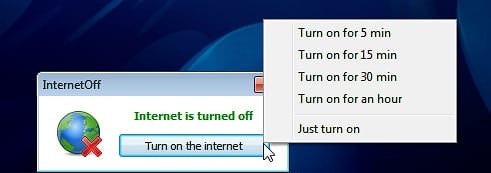
It would be awesome if there was a simple control to disconnect ourselves after a fixed amount of time. Better, if we can only get online for only few minutes and get disconnected easily. Get our work done and get offline automatically. Of course you’ll find many applications that lets you control your online time. Meet InternetOff a freeware app that helps you control your online time and increase productivity. [Read more...]

Google Docs Viewer Now Handles ZIP and RAR Archive Files

Google Docs Viewer just got a lot more useful. It now lets you view archive file types, ZIP and RAR contents online.

The Google Docs Viewer is an online service by Google which allows you to quickly view many file types. Using it, you can view PDFs, Microsoft Office files, and many image file types online and without leaving your browser. According to the official Google Docs Blog, now, if someone sends you a ZIP or RAR file in your Gmail, you’ll be able to view its contents from within your browser by clicking on View. This works for archives inside archive files too. Like, if you have a ZIP file inside a RAR file (or vice versa) you can simply click on that file to get access to the contents of the embedded archive.

[Read more...]

SpringPublisher: Design & Print Flyers, Business Cards, Letterheads [Freeware]

SpringPublisher is a freeware desktop publishing application for Windows. The application lets you easily create business cards, flyers, postcards, letterheads and other artworks within a few minutes.

Quality free software for creating business cards, flyers, postcards and letterheads are very sparse. Professional desktop publishing applications are normally very costly. But SpringPublisher comes here to fill in the void. With its powerful multilayered editor and lots of templates, your desktop publishing task becomes easier. [Read more...]

Vectorian Giotto: Create Flash Animation Without Adobe Flash [Freeware]

Last year in August, we reviewed a powerful flash animation software titled “Vectorian Giotto.” Back then it was a premium software worth $89.95. Vectorian Inc., the developers of Vectorian Giotto has announced a great news for all. They have released the new and redesigned version of Vectorian Giotto 3.0 and made it completely free. The developers also said that the new version is exactly 4 and a half times easier to work with the earlier version.

Vectorian Giotto helps create professional quality Flash animations without coding and experience. The application features more than 50 customizable effects that can be applied to both shapes and text. With over a 100 effect presets in store, it can display your flash content in different ways which you can adjust easily. The developer’s website hosts a very handy help manual with many tutorials to guide you through. Although it features full ActionScript 2.0 support, designers won’t need to think about this as the animation is created without any coding required.

vectorian-giotto-3

If you are wondering what is the difference between Giotto and Adobe Flash Professional? Here’s what the developers are saying:

Vectorian Giotto is simpler, easier to use and much cheaper alternative software to Adobe Flash. Both applications use similar approach (with Giotto being easier to use) to produce SWF (“Small Web Format” or “Shockwave Flash”) files that can be embedded into websites to enrich them with animation and/or interactivity.

Using the free flash creator software you can create from simplest to complex vector illustrations, apply effects to them (blur, shadow, glow) and then animate them. You can create Movie Clips and Buttons, store them in the library and use them later. You can easily work with text elements and adjust things such as kerning and alignment. The animation can be executed using motion, shape tweens. Sounds can be included in your creations to make more advanced animations.

The built-in editor of the application’s color palettes is very intuitive. The editor uses special algorithms build upon human perception of colors instead of the old school mathematical models.

To conclude, Vectorian Giotto 3.0 is certainly a very remarkable tool for designers who don’t want to code but instead concentrate on their designing, plus the application is completely freeware for all. You can download Vectorian Giotto 3.0 freeware from the official webpage.

LibreOffice 3.4.0 Released, TDF Clarifies Version Numbering

Oracle’s decision to give OpenOffice.org (OOo) assets to the Apache Software Foundation and not The Document Foundation (TDF) has not stopped TDF to roll out a major release of LibreOffice (LO), a fork of OpenOffice. LibreOffice is widely adopted now and is becoming very popular. Major Linux distros including UbuntuFedora and Linux Mint has dropped OOo for LO.

LibreOffice 3.4.0 is the second major release of the suite since the announcement of TDF in September 2010. LO 3.4.0 is a major release of the open-source free office suite now incorporates the contributions of more than 120 developers (six times as many as the first beta released on the launch date).

LibreOffice was created as a fork of the OpenOffice.org productivity suite back in September, of course, due to uncertainty over the future of OOo after Oracle acquired the project. [Read more...]