Tag Archives: office 2010

Download Microsoft Office 2010 Free 60-Day Trial Version

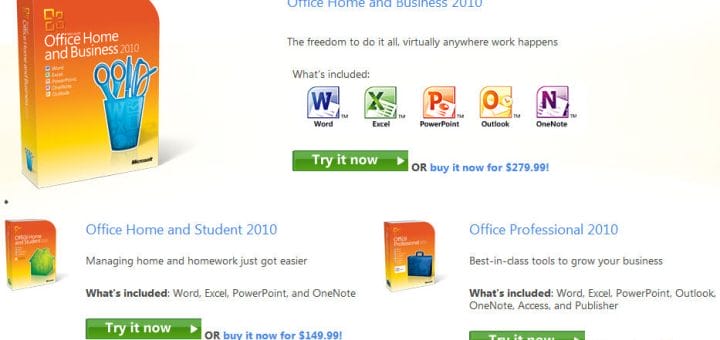
Microsoft has released Office 2010. It is available in three different retail editions:

  1. Office Home and Business 2010
  2. Office Home and Student 2010
  3. Office Professional 2010

Office Home and Student 2010 is the basic edition that is retailing for $149.99 and includes the core Office modules including Word, Excel, PowerPoint and OneNote. Office Home and Business 2010 which retails for $279.95 and includes Microsoft Outlook on top of what is offered in the basic edition. Office 2010 Professional which retails for $499.95 and is the only edition that includes Access 2010 and Publisher 2010.

Continue Reading

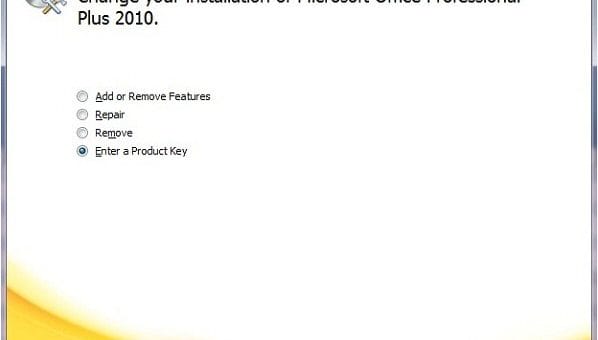
How to Change Product Key of Microsoft Office 2010 & Visio 2010

If you need to change your Microsoft Office 2010 or Visio 2010 product key to resolve activation issues or other reasons, then you can do so very easily. You may also find How To Use Microsoft Office 2010 for 180 days Free without Activating? useful.

Previously we have shown "How To Change Windows Product Key After Install", so if you need to change your Windows 7 or Vista key, you can head over to that post for reference.

Now, coming back to today's topic on How to Change Product Key of Microsoft Office 2010 & Visio 2010, just follow the simple steps below:

Continue Reading

How To Use Microsoft Office 2010 for 180 days Free without Activating?

If you have installed Microsoft Office 2010 and haven't activated it, you will find that Microsoft allows you to use the full functionality of Office 2010 for 30 days. After this 30 days of free usage, you have to register Microsoft Office 2010 to continue using it. But most of you will be happy to know that much like Microsoft Windows 7 (you can extend the trial up to 120 days), you can rearm and use Microsoft Office 2010 and extend the trial up to 6 months or 180 days. After this grace period, Office 2010 will automatically start functioning in reduced functionality mode to remind the user that the software needs to be activated.

Microsoft now requires all installed copy of Office 2010 to be activated, including licenses sold through volume licensing. So, the rearm function in Office 2010 is actually provided for the convenience of corporate customers. Microsoft allows in total 5 rearm of Office 2010, where after reset, added 30 days of free usage is allowed without activation. If the rearm is timed correctly at the last day of current 30 day cycle's end, theoretically, the 5 rearm can extend the free usage of Office 2010 up to 6 months or 180 days.

Continue Reading

Download Microsoft Office 2010 and Evaluate for 60 Days

Microsoft is going to soon launch Microsoft Office 2010 for the public soon. If you are still not sure if you should switch to Microsoft Office 2010 or stay with the present Microsoft Office version, Microsoft is providing you the option to download and test the latest version of Microsoft Office Professional Plus 2010 free for 60 days through Technet Evaluation Center.

Since, Microsoft Office Professional Plus 2010 is the most complete edition of Microsoft Office 2010 (see Microsoft Office 2010 Edition Comparison table below), therefor it is best suited for testing and evaluation purposes. Hence, Microsoft is providing Microsoft Office Professional Plus 2010 for testing and evaluating purpose.

Continue Reading

Office 2010 Coming in June; Free Office 2007 To Office 2010 Upgrade Period Starts Today

Microsoft Office 2010 will hit the retail shelves on June 15. At Technet, Microsoft announced that the free upgrade period starts today. This means that users who buy and activate Office 2007 from today will be able to download Office 2010 at no more cost when it becomes available in June 2010.

All you need to be eligible for this program – Office 2010 Technology Guarantee – is the following:

  • Purchase Office 2007, or a new PC with Office 2007, and activate it between March 5, 2010 and September 30, 2010.
  • Have, or create a Windows Live ID.
  • Redeem your Tech Guarantee before October 31, 2010 by visiting www.office.com/techg.

Continue Reading

Free Beta MAK Activation Keys for Office 2010, Visio, Project & Sharepoint 2010

Logo_MSFTOffice2010_187x54Microsoft Office Professional Plus 2010 Beta, Visio 2010 Beta, Project 2010 Beta, SharePoint 2010 Beta have been available free download and free usage till October 2010 after activated. Of the many beta products that available free download, Office Home and Business 2010 Beta and Office Professional 2010 Beta requires user-specific retail product key for activation, which can be requested online from officebeta.microsoft.com.

These MAK product key below (which is the same for every downloads) can be used to activate unlimited copy of Office Professional Plus 2010 Beta, Visio Premium 2010 Beta, Project Professional 2010 Beta, and SharePoint Server 2010 Beta.

Continue Reading

Microsoft Office 2010 Beta Downloads Now Available for Everyone

Microsoft Office 2010 Beta downloads have been active for a few days for MSDN and TechNet subscribers. Now Microsoft Office 2010 Beta downloads are available for the public and are now available on the official Microsoft Office 2010 Beta website. To be able to download the beta of Microsoft Office 2010, users need to first log in using a Microsoft Live account and fill out a short form. Downloads are available for both 32-bit and 64-bit editions and for various languages. The product key for the beta will also be displayed on those pages. This key is required to activate the beta after installation.

Continue Reading
Page 1 of 11

Switch to our mobile site

Site Meter