How To Enable Google’s New Navigation Menu Bar

Google is soon going to enable the new navigation menu replacing the current black navigation bar.

“The Google bar, which runs across the top of the browser of nearly all Google services and offers easy access to Google’s products, has recently updated its look for a more consistent, streamlined user experience and increased visibility of the most popular services,” explains Google.

The new navigation looks much more elegant and compact. You will find the gray navigation bar above each of Google’s products. The bar basically has three main areas. When you hover your mouse pointer over the Google logo on the left or click on it, a drop-down menu will appear with links to Google services. The menu links to Google+, Web Search, Image Search, Google Maps, YouTube, Google News, Gmail and Google Docs, but you can mouse over “More” to see more services. The central area has a search box for the Google service you are using now. The right side features a share box and notifications to take part on Google+ from any Google page. [Read more...]

How To Get The New YouTube Homepage Before It Is Officially Rolled Out

Google is testing a new homepage design for YouTube (not the Cosmic Panda test). Even though there is no official announcement, you can get a taste of it using a simple cookie trick. If you don’t like it or want to get back to the old YouTube interface, simply delete the cookie. [Read more...]

CCleaner Updated with Internet Explorer 9, Firefox 4 Support

CCleaner is one of the most popular Windows system maintenance program. Piriform, the developers of CCleaner has released a minor but very important update, CCleaner version 3.05. The update now includes full support for recently-released browsers, Internet Explorer 9 and Firefox 4.

The updated version of this app now has better registry scanning for unused file extensions, obsolete software references, and invalid BHOs. The improved registry cleaner now has trimmed out old Firewall entries and added a lot more third-party cleaning rules. You can view the full range of changes present in the latest version below.

If you are installing the application for the first time, you will get a dialog box (see screenshot below) asking you, if you want to Intelligently scan for cookies to keep. This function allows the application to keep your persistent login cookies for websites such as Hotmail, Gmail and Yahoo Mail. [Read more...]

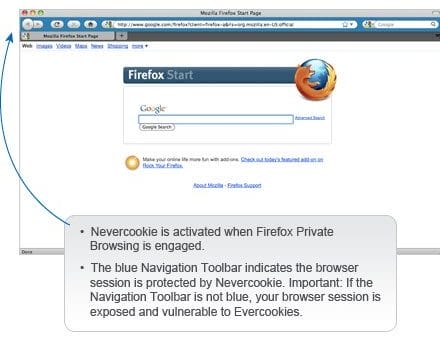
Anonymizer Nevercookie: Firefox Add-on to Kill the Evercookie

Is it too much if one is asking for one’s own privacy on the Internet these days? First, we had normal browser cookies, then we had more persistent Flash cookies and now the Evercookie that can provide everyone from advertisers to malware authors with useful information about the sites you have visited and more. Evercookie, an open source JavaScript API developed by security researcher Samy Kamkar, when implemented by any website stores a user ID and cookie data in eight different places. This makes evercookie a more persistent cookie form than Flash cookies or normal browser cookies.

Its goal is to identify a client even after they’ve removed standard cookies, removed Flash cookies (Local Shared Objects or LSOs), and others. This allows websites to track user behavior even when users have enabled private browsing because an Evercookie stores data in locations outside of where standard cookies are stored, an Evercookie can rebuild itself unless users go through a number of steps to completely clear and reset their local storage. [Read more...]

Google Analytics Opt-Out Browser Add-on

Google has recently released a Web browser add-on that will stop the browser from sending information to the Google Analytics service.

To provide website visitors with more choice about how their data is collected by Google Analytics, we have developed the Google Analytics Opt-out Browser Add-on. The add-on communicates with the Google Analytics JavaScript (ga.js) to indicate that information about the website visit should not be sent to Google Analytics.

Mainly websites use Google Analytics service to know their site’s traffic pattern and to optimize their website further for their visitors. When a person visits a site, Analytics creates a cookie on the person’s computer. Cookies are small data files used to record information about how a person interacts with a website. You can easily remove cookies from any browser. [Read more...]

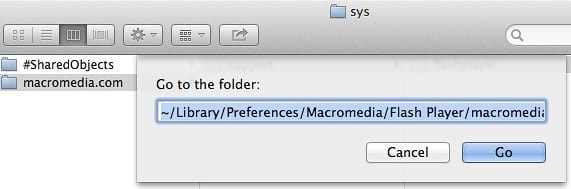
Flush.app – Easily Clean Flash Cookies in Apple Mac OS X

Few days back, we shared with you a portable Windows application, “Flash Cookie Cleaner” for cleaning Flash Cookies. Today, we are going to share a similar application “Flush.app” which is made for Apple Mac OS X users. We described in our previous article what these Flash Cookies really are. For those who are still ignorant about Flash cookies or super cookies, which is called Local Shared Objects (LSO), they work in a similar way as any regular browser cookies but are stored outside the purview of your browser. [Read more...]

Flash Cookie Cleaner – Helps Clean Flash “Super” Cookies or LSO from Computer

Flash Cookies also known as super cookies or Local Shared Objects (LSO) are a collection of data like cookies stored as a file on your computer. LSO’s can be used by websites to collect information on how people navigate them. These LSO’s are also used to track users and store information about them. You cannot usually delete LSO by using the privacy controls present in a browser.

To clean these persistent Flash cookies which is a great threat to the privacy, you can use a simple application known as Flash Cookie Cleaner. Flash Cookie Cleaner is a portable application available for free. It helps you to easily clean Flash cookies or super cookies from your computer with just a single click. [Read more...]